SmartFind Express CSV workflow

SmartFind Express CSV Import for Teacher Coverage

Already using SmartFind Express? Import compatible absence CSV exports into CoverGrid to preview jobs, reconcile teachers and organize daily school coverage.

Independent software. Compatible SFE CSV imports available now; API connectivity may be possible with authorized access and configuration. No official PowerSchool affiliation.

From absence export to daily coverage

Keep your existing substitute-management process. CoverGrid adds a school-office workflow for reviewing absences and coordinating coverage using your configured school rules.

STEP 01 · EXPORT

Export an SFE report

Download a compatible SmartFind Express absence/job CSV report using your school's existing access.

STEP 02 · PREVIEW

Review before import

Upload the CSV to CoverGrid. Inspect teacher matches, new versus previously imported records, and cancelled or ignored jobs.

STEP 03 · COVER

Generate and review

Queue eligible absences, generate coverage using school timetables and rules, then review assignments and notifications.

How CoverGrid Uses SmartFind Express Daily Absence Reports

Schools already using SmartFind Express can keep their substitute-management process and use a compatible Today’s Jobs or Job Inquiry CSV export to coordinate school-level teacher coverage in CoverGrid.

01 · Export the daily report

Download a compatible SmartFind Express CSV file using your school's authorized access. CoverGrid uses the exported job information; the CSV workflow does not require a direct API connection.

02 · Preview and reconcile jobs

Check teacher matches, job dates, substitute status and existing absence records. CoverGrid categorizes entries as New Absence, Already in CoverGrid, Needs Review or Cancelled / Ignore before anything is queued.

03 · Build a coverage plan

Add eligible new absences to the Daily Coverage queue, then generate and review assignments using the school's timetable, available teachers and configured coverage limits. Importing a file alone never sends notifications.

04 · Review, notify and track

Use Coverage Records to check assignments and reassign coverage when needed. CoverGrid supports in-house teacher coverage, supply staffing options, staff responses and reporting according to the school's settings.

SmartFind Express CSV Import and API Connectivity

Compatible CSV imports — available now

Upload a compatible SmartFind Express daily absence or job CSV report into CoverGrid for a read-only preview of matches, filled or unfilled jobs, duplicate records and items requiring review.

API connectivity — assessed case by case

An API-based connection may be possible where a school or district has authorized SmartFind Express API access and the necessary technical configuration. An operational direct SFE API integration is not part of the current demonstrated workflow.

CoverGrid is independent software and is not affiliated with, endorsed by or an official integration partner of PowerSchool or SmartFind Express.

What CoverGrid adds after SFE

Duplicate-aware preview

Distinguish new absences from records already in CoverGrid before importing.

Timetable-aware coverage

Apply school-specific coverable periods and teacher availability.

Coverage review and reassignments

School staff review the generated plan before sending assignments.

Records and response tracking

See assigned coverage, confirm/unable responses and reporting history.

See SmartFind Express Import in Action

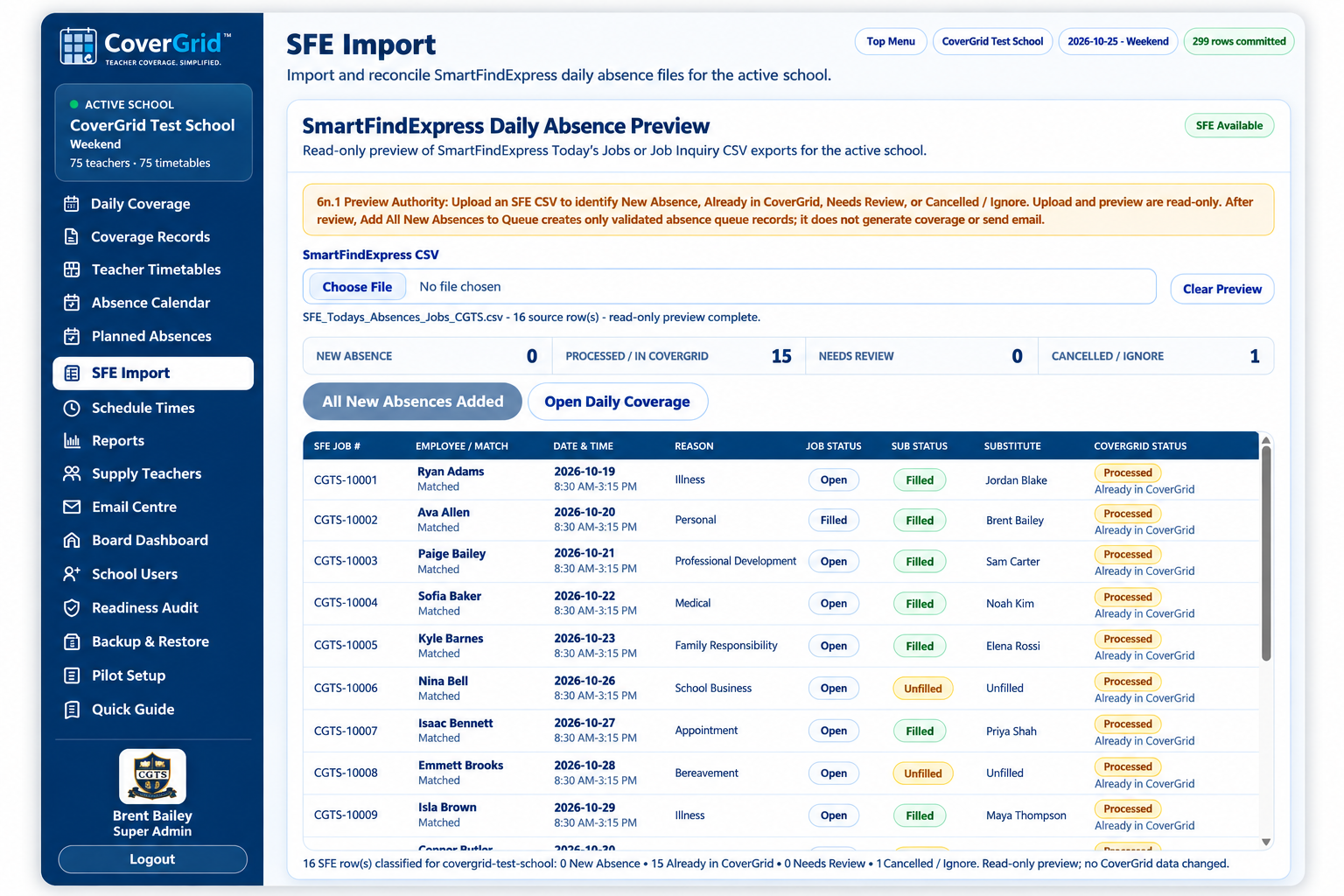
Review incoming SFE jobs, identify already imported records, and check teacher matches before adding eligible absences to Daily Coverage.

CoverGrid's SmartFind Express CSV Import preview shows SFE jobs, existing-record checks, and teacher matching before new absences are queued. Shown with CoverGrid Test School demonstration data.

SmartFind Express CSV import: FAQs

How does CoverGrid work with SmartFind Express?

CoverGrid makes it easy to use your existing SmartFind Express workflow. Export a compatible daily absence or job report as a CSV file, upload it to CoverGrid, and review the matched teachers, new absences, existing records, and jobs needing attention before adding eligible absences to Daily Coverage.

Can CoverGrid connect to SmartFind Express through an API?

An API-based connection may be possible where authorized SmartFind Express API access and the required technical configuration are available. The currently demonstrated CoverGrid workflow uses SFE CSV file imports; a live API connection is not included by default. Contact us to discuss integration requirements for your school or district.

Does CoverGrid replace SmartFind Express?

No replacement is necessary. Schools can continue using SmartFind Express for substitute-management processes while CoverGrid helps coordinate school-level teacher coverage, apply school-specific timetable and assignment rules, review generated coverage, and track responses.

What happens to cancelled or unfilled SFE jobs?

CoverGrid identifies relevant job and substitute statuses during the CSV preview. Cancelled or ignored records are excluded from automatic queuing; unfilled substitute jobs can be reviewed in context before eligible absences are added to the coverage queue. Importing a CSV alone does not generate assignments or send emails.

Can staff review and avoid duplicates before importing?

Yes. The read-only SFE preview checks teacher matching, identifies records already in CoverGrid, separates new absences from items needing review, and shows job status. Administrators decide when to add validated new absences to the queue.

Can CoverGrid assign in-house teachers and supply teachers?

Yes. CoverGrid can generate and review coverage assignments using the active school’s configured timetable, teacher availability, preferred staffing order, and coverage limits. Depending on school configuration, this can include in-house teachers and supply substitutes, with reassignment and response tracking.

How can schools manage unfilled SmartFind Express jobs?

CoverGrid shows unfilled substitute jobs in compatible SFE CSV previews so school staff can identify absences that may require additional coverage. Administrators can review eligible new absences and generate an in-house or supply coverage plan using their school’s configured rules.

Can CoverGrid help prevent duplicate SmartFind Express absence imports?

Yes. The read-only import preview checks job information against existing CoverGrid absence records and identifies entries already in CoverGrid. New, existing, cancelled and needs-review records are separated before eligible new absences can be queued.

Can CoverGrid provide coverage reports after importing SFE jobs?

Yes. After eligible absences are added and coverage assignments are generated, Coverage Records and reporting tools help administrators review coverage assignments, staff responses and coverage activity. Importing an SFE file by itself does not create coverage or email staff.
See the SFE-to-CoverGrid workflow

Explore how your school can review absence exports and coordinate teacher coverage.

Book a 30-Minute Demo

CoverGrid is independent of, and is not affiliated with or endorsed by, PowerSchool or SmartFind Express.